
 Image 1 of 4
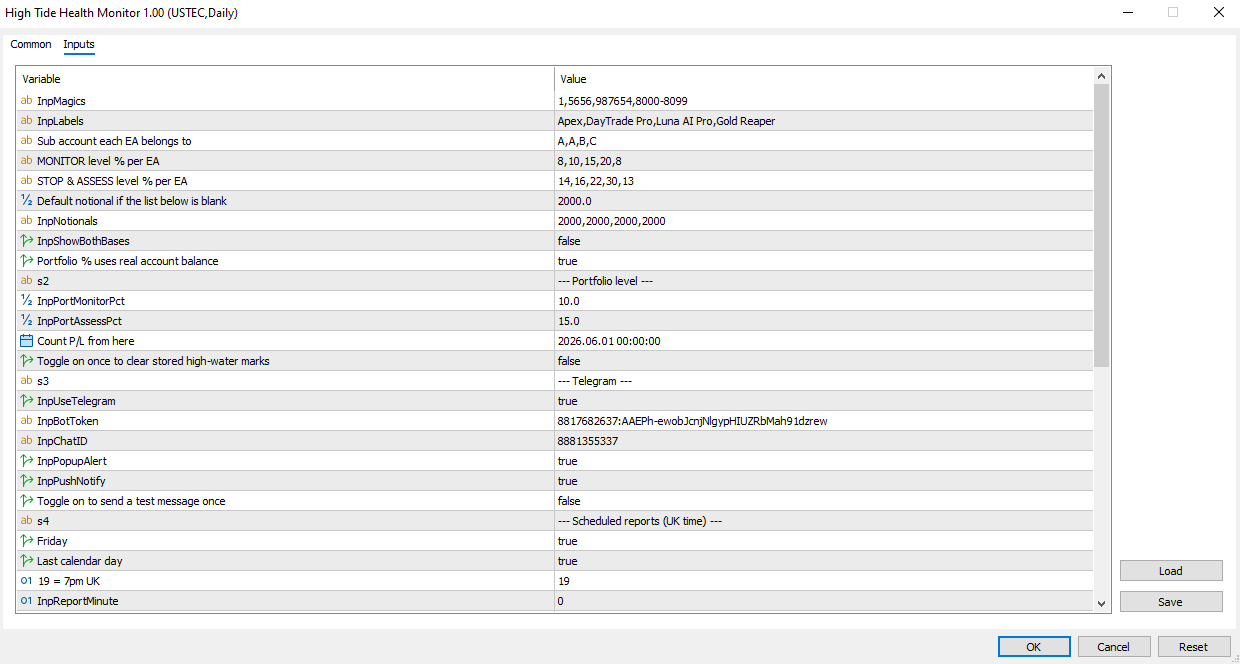 Image 2 of 4
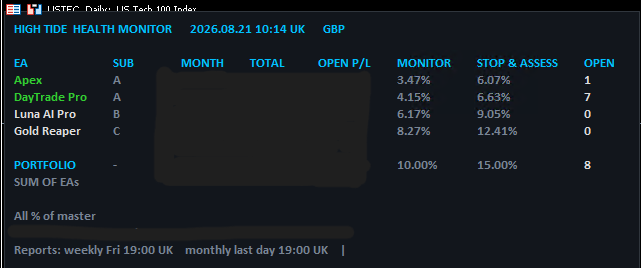 Image 3 of 4
 Image 4 of 4
High Tide Health Monitor
What the Health Monitor does
The High Tide Health Monitor is a free MetaTrader 5 tool for anyone running several EAs, several accounts, or a trade copier.
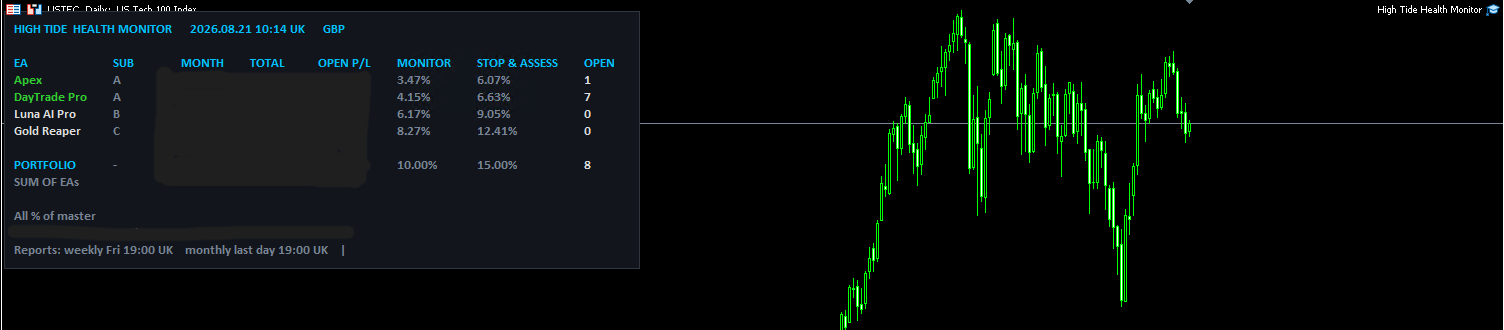
It puts everything on one panel: live P/L for your master account and each connected sub, attributed by magic number so you can see which system produced what.
Then it watches for the three things that quietly go wrong in a multi-account setup and tells you when they do.
The problems it was built for
Running one EA on one account is easy to keep an eye on. Running four EAs across four accounts through a copier is not, and the failures are usually silent.
A terminal dies and you don't notice. A VPS reboots, MT5 doesn't restart, and a sub account stops trading. Nothing alerts you, because nothing has gone wrong exactly — it's just stopped. The Health Monitor flags any account whose report goes stale.
The copier drops trades. Your sub opens a position, the master doesn't receive it. Or it receives it at the wrong size. Your accounts drift apart and you find out weeks later reconciling statements. The Health Monitor compares floating P/L between master and sub and warns you when they diverge beyond a threshold you set.
Correlated drawdown creeps up on you. Four EAs, each within its own limits, all drawing down at once. No single system has breached anything. Your account is still in trouble. The Health Monitor tracks floating drawdown at portfolio level, which is the level that actually matters.
The circuit breaker
There's an optional last-resort guard. If floating drawdown reaches the percentage you set, it closes every open position, deletes every pending order, and stays locked out for a period you choose so nothing immediately re-enters.
Read that twice, because it matters: this feature closes positions. It's off until you arm it, and you should test it on a demo account before you rely on it. It's a floor, not a strategy.
Most EAs have internal drawdown limits, but those only ever see their own trades. If you run several systems on one account, nothing is watching the total. This does.
What's on the panel
Open, monthly and overall P/L for the master and for every sub. Position and order counts per account. Time since each account last reported. Floating drawdown against your threshold. Divergence between master and sub.
Alerts go to MT5 pop-ups, mobile push and Telegram.
How it fits together
The Health Monitor runs on your master chart. A small companion reporter runs on each sub account and publishes its state to a shared folder, which is how the master can show you sub P/L without any account credentials being involved anywhere.
Both terminals need to be on the same machine, which for most people running a copier they already are.
Requirements
MetaTrader 5. Master and sub terminals on the same machine. AutoTrading enabled if you arm the circuit breaker, since closing positions is a trade operation.
Works with any copier and any broker. Nothing to link, no credentials, no external service.
Included
The Health Monitor EA, the sub account reporter, and setup instructions.
Free. No trial, no upsell, no card details.
FAQ
Is the Health Monitor really free? Yes. No trial, no locked features, no payment details.
Does it place trades? Only if you arm the circuit breaker, and then only to close positions. It never opens anything. With the breaker off it's read-only.
Will it work with my trade copier? Yes. It watches accounts, not the copier, so it doesn't care which one you use. The divergence warning works by comparing what the master and sub are each holding.
Do I need to give it my account details? No. Both terminals are already logged in on your machine, and the sub accounts publish to a shared local folder. Nothing leaves your computer except the alerts you configure.
How many sub accounts does it handle? Three, plus the master.
What if a sub account is on a different VPS? It won't see it. Sub reporting works through a shared local folder, so master and subs need to be on the same machine.
Can I use it with just one account? Yes. You'll lose the sub P/L panel and the divergence warnings, but the portfolio drawdown tracking and circuit breaker work on a single account running multiple EAs.
Is the circuit breaker safe to leave on? Test it on demo first. It closes every position when it trips, which is what you want in the situation it's built for, but you should see it happen once before you rely on it. It's off by default.
Do I need a VPS? If you're running EAs, you probably already have one. The Health Monitor needs to be running to monitor anything.
Notes for the site build
Schema. Both FAQ blocks should be marked up as FAQPage schema. That's the single highest-value thing for AI answer engines — it's the format they lift from most readily. SoftwareApplication schema with price: 0 on both pages.
Internal linking. Regime Radar should link to the EA review pages, since someone researching regimes is researching systems. The Health Monitor should link to the trade copier page, because the two solve adjacent problems and anyone running a copier is the exact audience.
Primary keywords. Regime Radar: free MT5 indicator, market regime indicator MT5, MT5 volatility dashboard, forex market regime. Health Monitor: MT5 portfolio dashboard, trade copier monitoring, MT5 multi account monitor, EA drawdown protection.
Both are low-competition long-tail. "Free MT5" prefixed terms convert well because intent is unambiguous.
Two things to check before publishing.
The Health Monitor copy describes the three-sub version we built. If the public release differs from what's running on your own portfolio, tell me what changed and I'll adjust — particularly the sub count and whether the reporter is bundled.
And on compliance: both pages are software-led with no performance figures, no returns, no testimonials, and no call to action pointing at a broker or copy-trading platform. The only action is downloading free software, which isn't an investment decision. That reads as clear of s21 to me, but I'm not your compliance specialist and free tools that funnel to email capture sit close enough to the line to be worth a look before they go live.
What the Health Monitor does
The High Tide Health Monitor is a free MetaTrader 5 tool for anyone running several EAs, several accounts, or a trade copier.
It puts everything on one panel: live P/L for your master account and each connected sub, attributed by magic number so you can see which system produced what.
Then it watches for the three things that quietly go wrong in a multi-account setup and tells you when they do.
The problems it was built for
Running one EA on one account is easy to keep an eye on. Running four EAs across four accounts through a copier is not, and the failures are usually silent.
A terminal dies and you don't notice. A VPS reboots, MT5 doesn't restart, and a sub account stops trading. Nothing alerts you, because nothing has gone wrong exactly — it's just stopped. The Health Monitor flags any account whose report goes stale.
The copier drops trades. Your sub opens a position, the master doesn't receive it. Or it receives it at the wrong size. Your accounts drift apart and you find out weeks later reconciling statements. The Health Monitor compares floating P/L between master and sub and warns you when they diverge beyond a threshold you set.
Correlated drawdown creeps up on you. Four EAs, each within its own limits, all drawing down at once. No single system has breached anything. Your account is still in trouble. The Health Monitor tracks floating drawdown at portfolio level, which is the level that actually matters.
The circuit breaker
There's an optional last-resort guard. If floating drawdown reaches the percentage you set, it closes every open position, deletes every pending order, and stays locked out for a period you choose so nothing immediately re-enters.
Read that twice, because it matters: this feature closes positions. It's off until you arm it, and you should test it on a demo account before you rely on it. It's a floor, not a strategy.
Most EAs have internal drawdown limits, but those only ever see their own trades. If you run several systems on one account, nothing is watching the total. This does.
What's on the panel
Open, monthly and overall P/L for the master and for every sub. Position and order counts per account. Time since each account last reported. Floating drawdown against your threshold. Divergence between master and sub.
Alerts go to MT5 pop-ups, mobile push and Telegram.
How it fits together
The Health Monitor runs on your master chart. A small companion reporter runs on each sub account and publishes its state to a shared folder, which is how the master can show you sub P/L without any account credentials being involved anywhere.
Both terminals need to be on the same machine, which for most people running a copier they already are.
Requirements
MetaTrader 5. Master and sub terminals on the same machine. AutoTrading enabled if you arm the circuit breaker, since closing positions is a trade operation.
Works with any copier and any broker. Nothing to link, no credentials, no external service.
Included
The Health Monitor EA, the sub account reporter, and setup instructions.
Free. No trial, no upsell, no card details.
FAQ
Is the Health Monitor really free? Yes. No trial, no locked features, no payment details.
Does it place trades? Only if you arm the circuit breaker, and then only to close positions. It never opens anything. With the breaker off it's read-only.
Will it work with my trade copier? Yes. It watches accounts, not the copier, so it doesn't care which one you use. The divergence warning works by comparing what the master and sub are each holding.
Do I need to give it my account details? No. Both terminals are already logged in on your machine, and the sub accounts publish to a shared local folder. Nothing leaves your computer except the alerts you configure.
How many sub accounts does it handle? Three, plus the master.
What if a sub account is on a different VPS? It won't see it. Sub reporting works through a shared local folder, so master and subs need to be on the same machine.
Can I use it with just one account? Yes. You'll lose the sub P/L panel and the divergence warnings, but the portfolio drawdown tracking and circuit breaker work on a single account running multiple EAs.
Is the circuit breaker safe to leave on? Test it on demo first. It closes every position when it trips, which is what you want in the situation it's built for, but you should see it happen once before you rely on it. It's off by default.
Do I need a VPS? If you're running EAs, you probably already have one. The Health Monitor needs to be running to monitor anything.
Notes for the site build
Schema. Both FAQ blocks should be marked up as FAQPage schema. That's the single highest-value thing for AI answer engines — it's the format they lift from most readily. SoftwareApplication schema with price: 0 on both pages.
Internal linking. Regime Radar should link to the EA review pages, since someone researching regimes is researching systems. The Health Monitor should link to the trade copier page, because the two solve adjacent problems and anyone running a copier is the exact audience.
Primary keywords. Regime Radar: free MT5 indicator, market regime indicator MT5, MT5 volatility dashboard, forex market regime. Health Monitor: MT5 portfolio dashboard, trade copier monitoring, MT5 multi account monitor, EA drawdown protection.
Both are low-competition long-tail. "Free MT5" prefixed terms convert well because intent is unambiguous.
Two things to check before publishing.
The Health Monitor copy describes the three-sub version we built. If the public release differs from what's running on your own portfolio, tell me what changed and I'll adjust — particularly the sub count and whether the reporter is bundled.
And on compliance: both pages are software-led with no performance figures, no returns, no testimonials, and no call to action pointing at a broker or copy-trading platform. The only action is downloading free software, which isn't an investment decision. That reads as clear of s21 to me, but I'm not your compliance specialist and free tools that funnel to email capture sit close enough to the line to be worth a look before they go live.