
 Image 1 of 4
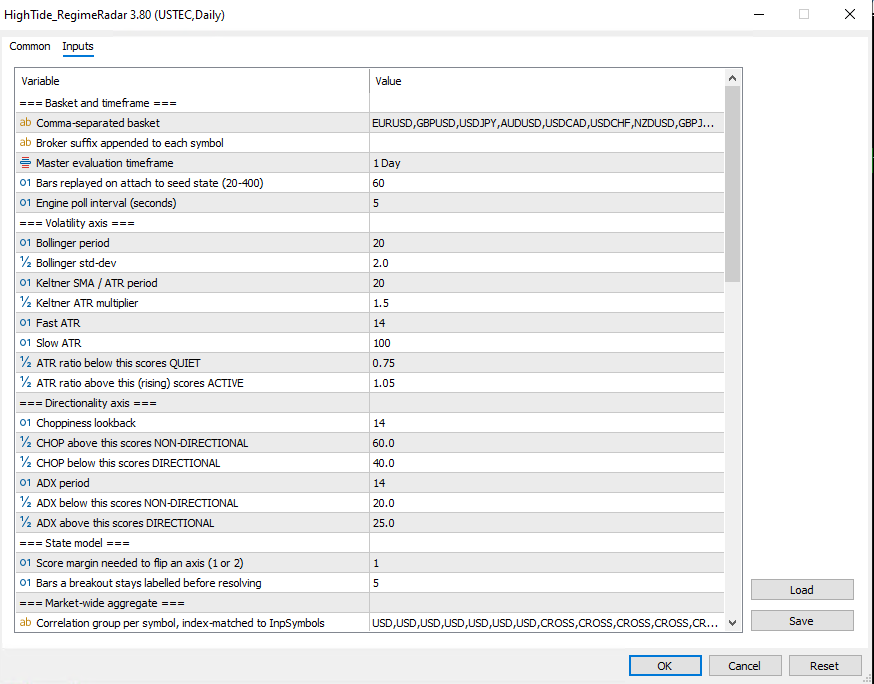 Image 2 of 4
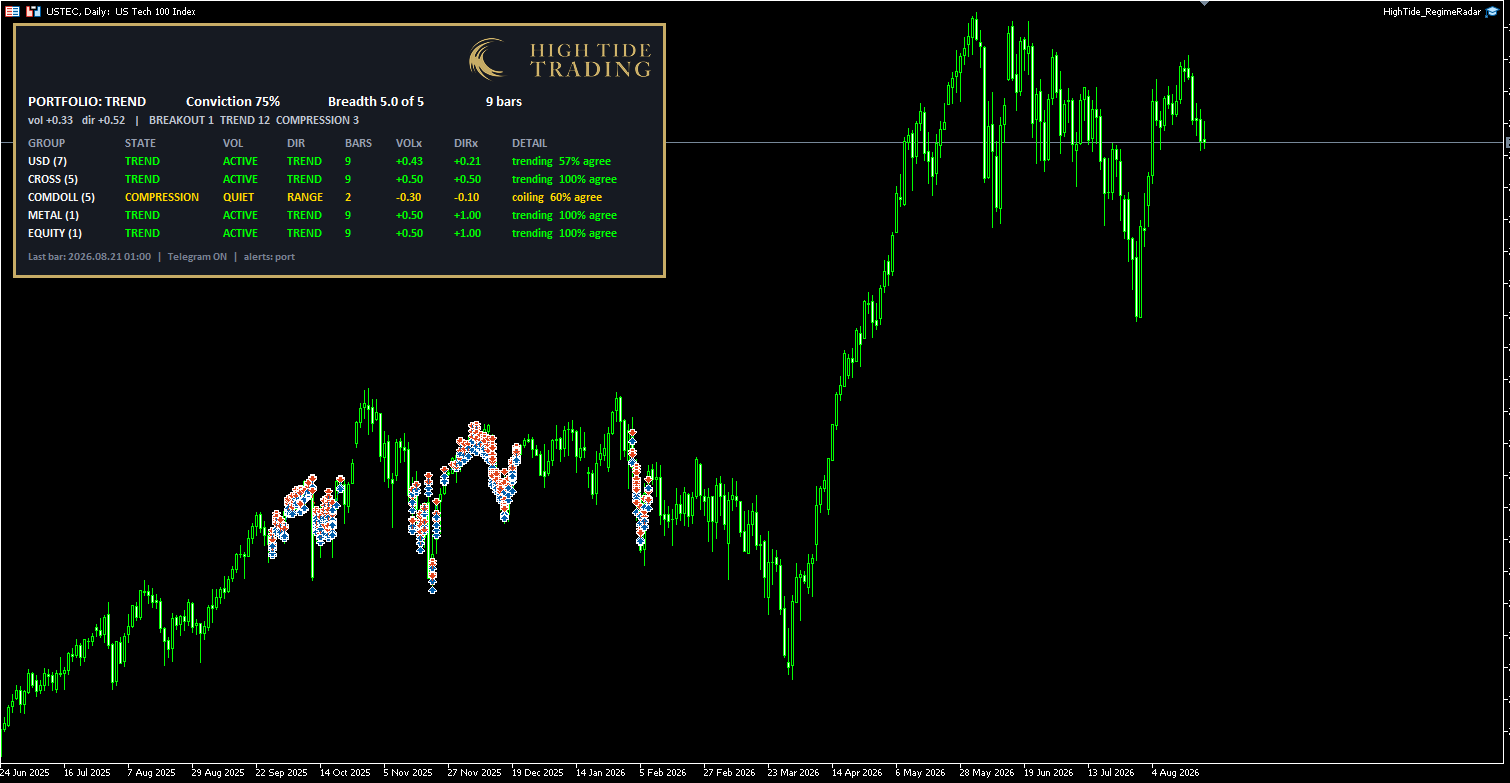 Image 3 of 4
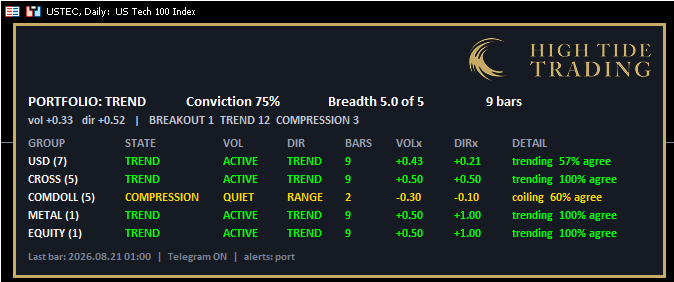 Image 4 of 4
High Tide Regime Radar
What Regime Radar does
Regime Radar is a free MetaTrader 5 tool that classifies market conditions across a basket of instruments. It runs on a single chart and analyses up to 40 symbols in the background.
It answers one question: what kind of market is this right now? Not where price is going. What it's doing.
The default basket is 19 instruments — seven USD majors, five JPY and CHF crosses, five commodity-dollar pairs, gold and the S&P 500.
It places no trades. It calls no trading functions at all.
Why most regime indicators only see half the picture
Most of them measure volatility. High or low, quiet or busy.
That misses something important. A market can be violently volatile and go absolutely nowhere, and that is a completely different situation from a steady grind in one direction. Both read as "high volatility". Only one of them is a trend.
Regime Radar measures two independent things and crosses them.
Volatility — how much the market is moving. Two factors vote: whether the Bollinger Bands have contracted inside the Keltner Channels, and the ratio of fast ATR to slow ATR.
Directionality — how efficiently it's moving. Two more vote: the Choppiness Index and ADX.
The four market regimes
Compression — quiet and range-bound. Ranges narrowing, price going sideways. The market is coiling.
Trend — active and directional. Price is moving and it's getting somewhere.
Chop — active but going nowhere. Wide ranges, violent reversals, no net progress. The post-news whipsaw, and the state that punishes breakout systems hardest.
Drift — quiet but directional. A slow grind in one direction on low volatility.
Breakout is the fifth label and it works differently. It's not a cell in that grid — it's the moment volatility expands out of compression. It's time-boxed, so an instrument carries it for five bars and then resolves into whatever it actually became. Trend, chop, or a failure straight back to compression.
That distinction matters. A breakout that's been running three weeks isn't news. One that happened yesterday is.
One reading for the whole basket
Nineteen instruments generating individual alerts would be unusable. So Regime Radar aggregates.
The catch is that a simple headcount lies to you. Seven USD pairs aren't seven opinions — if the dollar moves they all flip together, and you get a reading of "75% of the market is trending" when it's really one dollar bet.
So instruments are grouped by what actually drives them, and each group carries equal weight. Gold on its own weighs the same as all seven dollar pairs combined.
The portfolio line reads like this:
PORTFOLIO: TREND Conviction 62% Breadth 5.0 of 5 7 barsConviction is how much of the basket agrees. Below 40% it says MIXED rather than overstating what the data supports.
Breadth is how many independent readings the label rests on. All five groups reporting gives 5.0. If groups drop out it falls, and you can see the label is standing on thinner ground.
Alerts you'll actually keep switched on
By default you only get portfolio-level alerts, and only on breakouts and their resolution. On daily bars that's a handful a month, not a stream.
You can switch to individual instrument alerts, or both, or every state change if you want the detail.
Alerts go to MT5 pop-ups, mobile push, and Telegram. The Telegram message includes the state change, both axis readings, all four factor values and which instruments sit where.
Export the data and check it yourself
Regime Radar will write its full labelled history to CSV — one row per bar per instrument, with the state, both axes, event flags and raw factor values.
Join that against your own trade history and you can test whether your results actually differ by regime. If they look the same in every bucket, the classifier isn't capturing anything your strategies respond to. That's worth knowing before you build anything on top of it.
We'd rather you checked than took our word for it.
What it won't do
Regime Radar describes conditions. It doesn't predict them.
It tells you volatility expanded on a bar that has already closed. Compression is the most reliable of its labels, because a Bollinger squeeze is unambiguous. Trend is decent, though ADX lags by five to ten bars, so confirmation tends to arrive mid-move. Breakout is the weakest — it correctly spots that volatility has expanded, but most volatility expansions don't turn into sustained moves.
Use it for context. Not for entries.
Requirements
MetaTrader 5, build 3800 or later. Around 194 bars of history per instrument on your chosen timeframe. Defaults are tuned for the daily chart. For Telegram, one URL added to your MT5 whitelist.
Works on any broker. No account link, no login, nothing to connect.
Included
The EA, a 3,000-word manual with a troubleshooting section and FAQ, and the default 19-instrument basket ready to run. (Contact me for the user manual and troubleshooting documents at mark@hightidetrading.co.uk)
Free. No trial period, no upsell, no card details.
FAQ
Is Regime Radar really free? Yes. No trial, no locked features, no payment details.
Does it place trades? No. It calls no trading functions. You don't even need AutoTrading enabled.
Does it repaint? No. Everything is calculated on closed bars. The forming bar is never used, and a state assigned to a past bar won't change.
Will it work with my broker? Yes. It reads chart data only. If an instrument is named differently at your broker you can edit the list or set a suffix.
Can I run it on a chart I'm already trading? Yes. It only draws its own panel and removes everything cleanly when you detach it.
Do I need a VPS? Only if you want alerts reliably, since it has to be running at the bar close to catch a change. To just check the panel now and then, your desktop terminal is fine — it replays history on attach and always shows the current state.
Which timeframe should I use? Daily. That's what the defaults are tuned for. H4 works if you multiply every period by six so each factor still covers the same span of calendar time.
Can I add my own instruments? Up to 40. Add the symbol and give it a group tag so the weighting knows what it's correlated with.
Does it work on stocks, indices or crypto? Mechanically yes — the factors are generic price and volatility measures. The thresholds were tuned on FX and gold, so instruments with very different volatility may need those adjusting.
Why is it an Expert Advisor and not an indicator? MetaTrader blocks web requests inside indicators, which would make Telegram impossible. It's an EA that never trades.
What Regime Radar does
Regime Radar is a free MetaTrader 5 tool that classifies market conditions across a basket of instruments. It runs on a single chart and analyses up to 40 symbols in the background.
It answers one question: what kind of market is this right now? Not where price is going. What it's doing.
The default basket is 19 instruments — seven USD majors, five JPY and CHF crosses, five commodity-dollar pairs, gold and the S&P 500.
It places no trades. It calls no trading functions at all.
Why most regime indicators only see half the picture
Most of them measure volatility. High or low, quiet or busy.
That misses something important. A market can be violently volatile and go absolutely nowhere, and that is a completely different situation from a steady grind in one direction. Both read as "high volatility". Only one of them is a trend.
Regime Radar measures two independent things and crosses them.
Volatility — how much the market is moving. Two factors vote: whether the Bollinger Bands have contracted inside the Keltner Channels, and the ratio of fast ATR to slow ATR.
Directionality — how efficiently it's moving. Two more vote: the Choppiness Index and ADX.
The four market regimes
Compression — quiet and range-bound. Ranges narrowing, price going sideways. The market is coiling.
Trend — active and directional. Price is moving and it's getting somewhere.
Chop — active but going nowhere. Wide ranges, violent reversals, no net progress. The post-news whipsaw, and the state that punishes breakout systems hardest.
Drift — quiet but directional. A slow grind in one direction on low volatility.
Breakout is the fifth label and it works differently. It's not a cell in that grid — it's the moment volatility expands out of compression. It's time-boxed, so an instrument carries it for five bars and then resolves into whatever it actually became. Trend, chop, or a failure straight back to compression.
That distinction matters. A breakout that's been running three weeks isn't news. One that happened yesterday is.
One reading for the whole basket
Nineteen instruments generating individual alerts would be unusable. So Regime Radar aggregates.
The catch is that a simple headcount lies to you. Seven USD pairs aren't seven opinions — if the dollar moves they all flip together, and you get a reading of "75% of the market is trending" when it's really one dollar bet.
So instruments are grouped by what actually drives them, and each group carries equal weight. Gold on its own weighs the same as all seven dollar pairs combined.
The portfolio line reads like this:
PORTFOLIO: TREND Conviction 62% Breadth 5.0 of 5 7 barsConviction is how much of the basket agrees. Below 40% it says MIXED rather than overstating what the data supports.
Breadth is how many independent readings the label rests on. All five groups reporting gives 5.0. If groups drop out it falls, and you can see the label is standing on thinner ground.
Alerts you'll actually keep switched on
By default you only get portfolio-level alerts, and only on breakouts and their resolution. On daily bars that's a handful a month, not a stream.
You can switch to individual instrument alerts, or both, or every state change if you want the detail.
Alerts go to MT5 pop-ups, mobile push, and Telegram. The Telegram message includes the state change, both axis readings, all four factor values and which instruments sit where.
Export the data and check it yourself
Regime Radar will write its full labelled history to CSV — one row per bar per instrument, with the state, both axes, event flags and raw factor values.
Join that against your own trade history and you can test whether your results actually differ by regime. If they look the same in every bucket, the classifier isn't capturing anything your strategies respond to. That's worth knowing before you build anything on top of it.
We'd rather you checked than took our word for it.
What it won't do
Regime Radar describes conditions. It doesn't predict them.
It tells you volatility expanded on a bar that has already closed. Compression is the most reliable of its labels, because a Bollinger squeeze is unambiguous. Trend is decent, though ADX lags by five to ten bars, so confirmation tends to arrive mid-move. Breakout is the weakest — it correctly spots that volatility has expanded, but most volatility expansions don't turn into sustained moves.
Use it for context. Not for entries.
Requirements
MetaTrader 5, build 3800 or later. Around 194 bars of history per instrument on your chosen timeframe. Defaults are tuned for the daily chart. For Telegram, one URL added to your MT5 whitelist.
Works on any broker. No account link, no login, nothing to connect.
Included
The EA, a 3,000-word manual with a troubleshooting section and FAQ, and the default 19-instrument basket ready to run. (Contact me for the user manual and troubleshooting documents at mark@hightidetrading.co.uk)
Free. No trial period, no upsell, no card details.
FAQ
Is Regime Radar really free? Yes. No trial, no locked features, no payment details.
Does it place trades? No. It calls no trading functions. You don't even need AutoTrading enabled.
Does it repaint? No. Everything is calculated on closed bars. The forming bar is never used, and a state assigned to a past bar won't change.
Will it work with my broker? Yes. It reads chart data only. If an instrument is named differently at your broker you can edit the list or set a suffix.
Can I run it on a chart I'm already trading? Yes. It only draws its own panel and removes everything cleanly when you detach it.
Do I need a VPS? Only if you want alerts reliably, since it has to be running at the bar close to catch a change. To just check the panel now and then, your desktop terminal is fine — it replays history on attach and always shows the current state.
Which timeframe should I use? Daily. That's what the defaults are tuned for. H4 works if you multiply every period by six so each factor still covers the same span of calendar time.
Can I add my own instruments? Up to 40. Add the symbol and give it a group tag so the weighting knows what it's correlated with.
Does it work on stocks, indices or crypto? Mechanically yes — the factors are generic price and volatility measures. The thresholds were tuned on FX and gold, so instruments with very different volatility may need those adjusting.
Why is it an Expert Advisor and not an indicator? MetaTrader blocks web requests inside indicators, which would make Telegram impossible. It's an EA that never trades.